

Almost every manager in a mid-size organization has already tried AI. Someone on the team drafts emails with a chatbot, someone else uses it to summarize long documents, and at the last leadership meeting someone asked whether it could be connected to the CRM. These experiments matter, but they stay at the level of the individual. The work itself, the processes that move between departments, stays exactly as it was.
The gap between "we have AI tools" and "our organization works differently" is the gap this guide sets out to close. You don't close it by buying another license, or with a pilot that ends in a slide deck. You close it by bringing a new kind of employee into the organization: a digital employee, with a defined role, clear permissions and a place inside your existing processes.
In this first part we define the terms. We explain what a digital employee is and how it differs from a chatbot and from automation, why mid-size organizations stand to gain more than anyone, and what components make up a system that lets you run these employees in an orderly, secure way. In the parts that follow, we turn to the practical questions: how to choose your first process, how to prepare the infrastructure, how to implement, and how to scale to the whole organization.
What a digital employee actually is
A digital employee is an AI agent that does work on behalf of the organization, within boundaries the organization has set for it. The definition sounds simple, but every word counts. "Does work" means it doesn't just answer questions. It opens tickets, updates records, prepares documents and sends messages. "On behalf of the organization" means it operates as part of the team, not as one employee's personal toy. And "within boundaries" means someone decided in advance what it may and may not do.
The easiest way to think about a digital employee is to compare it to a new hire joining the organization. On day one, they get a username, a role, access to the systems they need, and a manager to report to. They don't get access to every folder on the server, they don't approve payments on their own, and they have someone to turn to when something is unclear. A digital employee is built on exactly the same logic.
Four traits that define a digital employee
- Identity: every digital employee has its own identity in the organization. At any moment you can tell who it is, what it did and on whose behalf.
- Role: it is assigned to a clear area of work, such as handling service requests, preparing quotes or reconciling invoices. A narrow, well-defined role works better than a general assistant that knows everything.
- Permissions: it accesses only the systems and data assigned to it, and takes only the actions it has been approved for.
- Bounded judgment: it knows when to stop. When an exception comes up, when information is missing or when a sensitive action is required, it hands the decision to a person.
The last trait may be the most important of all, and it's the one that gets forgotten in conversations about AI. A good digital employee isn't the one that does everything on its own. It's the one that does on its own what is safe to do on its own, and asks for help with everything else. An organization that understands this can start working with digital employees without giving up control.
A digital employee works inside the systems you already have
One more point worth understanding from the start: a digital employee doesn't replace your ERP, your CRM or your accounting system. It works on top of them, just as a human employee does. It reads data from your existing systems, updates them and moves information between them. That means there's no need for a major migration project, and your team keeps working in the screens it already knows.
Take an accounting firm that wants to make it easier to collect documents from clients. It doesn't need a new system. It needs a digital employee that can check which documents are missing from each file, send the client a polite reminder, take in the document when it arrives, file it in the right place and update the accountant in charge. Every one of these steps happens in tools the firm already uses. What changes is who does the grunt work.
And what happens when a client sends an unclear document, or writes that they're not sure which form they were asked to submit? This is where the fourth trait comes in. The digital employee doesn't guess. It flags the file, explains to the accountant what's missing and why it stopped, and waits for instructions. The accountant gets one focused question instead of a pile of emails, and decides in a minute. Professional responsibility stays with the person, and the technical work moves to whoever can do it fast and consistently.
Why now, and why mid-size organizations
Very large organizations can afford in-house development teams, innovation units and long projects. Very small businesses usually make do with cheap, off-the-shelf tools. Mid-size organizations sit in the middle, and they feel the pressure from both sides. Their customers expect the service level of a large company, their competitors move as fast as a small business, and their teams are lean.
In a mid-size organization, one person is often responsible for several areas at once. The finance manager also manages the bank relationship and regulatory reporting. The IT manager also handles procurement, security and employee support. The workload is similar to a large organization's, but there's no one to split it with. The result is familiar: good people spend much of their day on repetitive tasks instead of the work they were hired to do.
Growth without growing headcount at the same pace
The question every CEO of a mid-size organization asks is how to grow. The traditional path is well known: more customers require more employees, more employees require more managers, and more managers require more coordination. At some point the organization starts to slow down precisely because of its size, and margins erode.
Digital employees offer a different path. They let every human employee produce more, because part of the repetitive work moves to them. They let the organization take on more customers, more orders and more requests without headcount growing at the same pace. And when payroll doesn't rise in step with revenue, profitability improves. It doesn't happen overnight, but that's the direction.
It's also important to say what this is not. The goal is not to lay people off and replace them with machines. In many mid-size organizations the problem is the opposite: there aren't enough hands for the work that already exists, and hiring is hard. Digital employees take on what nobody wants to do, and free people for work that requires judgment, personal relationships and creativity.
Why now
Until recently, building an agent that understands a document, drafts a reply to a customer and decides where to route a request took a team of experts and months of development. Today's models do this well out of the box. What has changed isn't just the quality of the models, but also the maturity of the tools around them: ready-made connectors to business systems, structured ways to manage permissions, and the ability to run models inside the organization's own infrastructure.
There's also a simpler reason. Your employees are already using AI, with or without approval. They paste documents into external tools, use them to draft emails to customers and to summarize meetings. The question isn't whether AI will enter your organization, but whether it will enter in an orderly, secure and managed way, or in a scattered way that nobody controls.
Good to know
Unmanaged use of external AI tools is a real risk. Customer information, financial data and internal documents leave the organization without anyone knowing. The answer isn't to ban it, but to give employees a structured alternative that works better.
Chatbot, automation and digital employee: what's the difference
These three terms often come up in the same breath, and they're frequently confused. The difference between them isn't only technical. It determines what you can expect from each one, where it fits, and how it needs to be managed.
Chatbot: it can talk, but it can't work
A chatbot is a conversational interface. It receives a question and returns an answer. Older chatbots followed a rigid decision tree, while newer ones are built on language models and can hold a natural conversation. But even the best of them stop at the edge of the conversation. They can explain to a customer how to request a refund, but they can't check the order, approve the refund and update the accounting system.
That doesn't mean a chatbot has no value. It's excellent for answering common questions, initial guidance and finding information. The problem starts when an organization expects a chatbot to solve problems that require action. The customer gets a nice answer, and then waits for a person to actually do the work.
Automation vs. digital employee
Automation is a mature, proven tool. It carries out a fixed sequence of actions: when an email with a certain word arrives, move it to a folder; when a customer is created in the CRM, open an account in the billing system. Automation is fast, cheap and reliable as long as the world behaves exactly as planned. The moment a case arrives that no rule was written for, it gets stuck or, worse, keeps going and does the wrong thing.
Automation
- Follows fixed rules written in advance
- excellent for stable, predictable processes
- gets stuck on exceptions or unstructured information
- every change to the process requires rewriting the rules by hand
Digital employee
- Understands context and acts according to a goal and a role
- handles documents, emails and conversations in free-form language
- spots an exception and hands it to a person with an explanation
- learns the process from the organization's knowledge and improves over time
The essential difference is that a digital employee can handle mess. Most of the work in an organization doesn't arrive in tidy forms. It arrives in a hastily written email, a scanned PDF, a voice message or a phone call. Standard automation doesn't know what to do with that. A digital employee reads, understands, extracts the relevant information and decides on the next step, within the boundaries set for it.
They don't compete, they complement each other
In practice, a mature organization uses all three. Existing automations keep doing what they do well. The conversational interface becomes one of the ways employees and customers reach the digital employees. And the digital employees themselves handle the part that requires understanding and judgment, often triggering existing automations as part of the work.
Tip
When you evaluate an AI solution, ask one simple question: does it only answer, or does it also act? If it only answers, it's a chatbot. If it acts, but only by fixed rules, it's automation. If it understands, acts and knows when to stop, it's a digital employee.
What an operating system for digital employees is made of
You can build a single digital employee in almost any tool. Ten digital employees working across several departments, accessing different systems and working alongside people, need something else entirely. They need shared infrastructure that manages them, just as human employees need an HR department, a permissions system, policies and managers. We call that infrastructure an operating system for digital employees.
Without one, organizations quickly end up in a familiar place. Every department builds its own agent in a different tool, nobody knows what information each agent can access, there's no way to check what happened when something goes wrong, and organizational knowledge is scattered across dozens of separate configurations. An operating system brings all of this into one place. Here's how it's built.
- Identity and permissions. Every digital employee gets an identity in the organization, a defined role and precise permissions. Sign-in uses the organization's existing identity through SSO, and every digital employee accesses only the systems and data assigned to it.
- Processes. Work is defined as a business process with steps, conditions and decision points. Some steps are performed by a digital employee, some by a person, and the system makes sure work moves smoothly between them.
- Shared knowledge. Procedures, price lists, policy documents, customer history and answers to common questions live in one place. Every digital employee draws from the same source, so they all answer in the same spirit and from the same up-to-date information.
- Channels. Work in an organization happens in emails, phone calls and meetings. The system needs to capture all of these channels, transcribe and summarize them, and turn them into material you can act on.
- Oversight and audit trail. Sensitive actions wait for a manager's approval before they're carried out. Every action by every digital employee is logged, so you can always know what was done, when and why.
What it looks like in practice
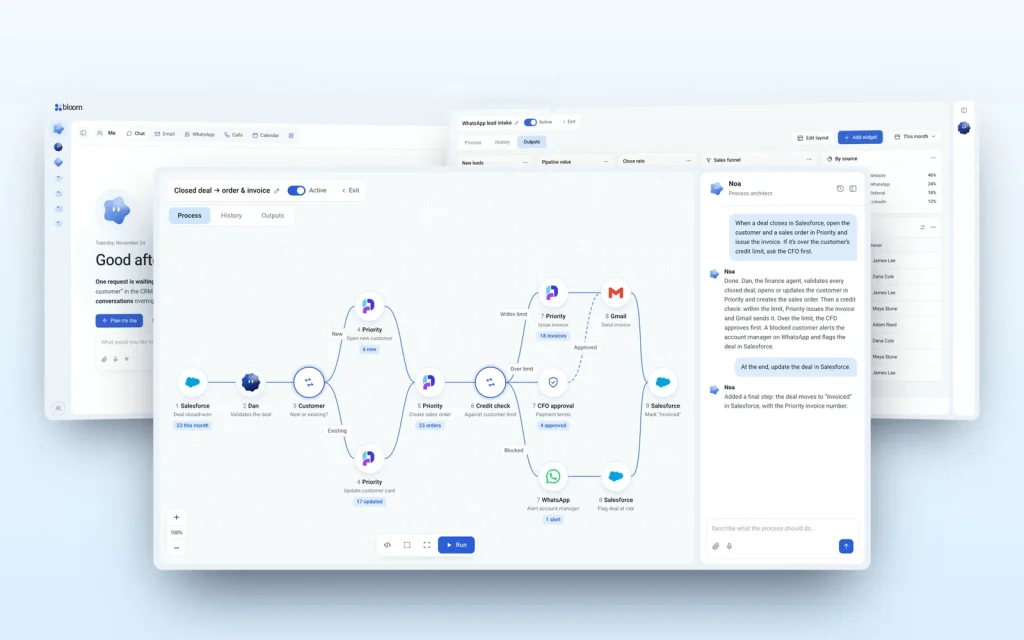
At bloom, we built the operating system around four modules that map to these components. bloom agent manages the digital employees themselves, with each one's identity, role and permissions. bloom workflow defines the business processes that digital employees and people run together. bloom omnichannel captures calls, meetings and emails, and transcribes and summarizes them. And bloom brain centralizes shared organizational knowledge, so every digital employee works from the same knowledge base.
The oversight layer runs across all the modules. Sensitive actions wait for approval, and every action is logged. The system runs on top of the organization's existing systems through ready-made connectors, APIs and database access, and doesn't replace them.
Where it runs and where the data is stored
A question that comes up in almost every conversation with IT and finance leaders is where the data goes. It's the right question, and the answer should be part of the plan from the start, not an afterthought. Different organizations need different levels of control, and a good operating system should support all of them.
bloom is installed in the organization's cloud, on the organization's servers, or on secure infrastructure managed by the bloom team. The choice of models is flexible too: you can work with the leading cloud models, or run models on a private GPU inside the organization's infrastructure, so the data never leaves it. The decision depends on how sensitive the data is, on regulatory requirements and on the organization's policy, not on the vendor's preference.
Why all the components have to work together
It's tempting to start with just one component. For example, build a knowledge base and connect a chat to it. That's a legitimate step, but it doesn't create a digital employee. A knowledge base without processes remains a search tool. Processes without precise permissions are a risk. Permissions without an audit trail make it impossible to check what happened. And all of these without channels miss most of the information flowing through the organization, the kind that's said on the phone and in meetings and never written down anywhere.
The real value comes when the components are connected. Picture a digital employee that receives an email from a customer, understands the problem, checks the knowledge base for the policy, opens the CRM to see the customer's history, prepares a resolution, waits for a manager's approval if the resolution involves a credit, and logs every step. Each of these steps is simple. Combining them is what turns a tool into an employee.
In the next part we move from definitions to practice. We'll look at how to identify the first process worth handing to a digital employee, how to choose the right department to start in, and what to prepare before you write a single line of configuration.
Step one: discovery. How to choose your first process
Most organizations that get stuck with AI don't get stuck because of the technology. They get stuck because they chose to start in the wrong place. A first process that's too big, too vague or too sensitive turns into a project that never ends. A first process that's small, clear and measurable becomes an internal success story everyone wants to be part of.
That's why discovery isn't a technical phase. It's a listening phase. You sit with the people who actually do the work, understand what their workday looks like, and look for the place where a digital employee can take a real share of the load. The goal isn't to find the most impressive process. The goal is to find the process most likely to succeed.
Five criteria for a good first process
As you go through your list of candidates, check each process against the following criteria. A process that meets all of them is a strong candidate. A process that fails two or more is better left for the second wave.
- Repetitive. Something that happens many times, every day or every week, and looks similar each time. For example, intake of requests, producing quotes, reconciling invoices or updating customer status.
- A clear owner. There's one person responsible for the process who knows it in depth and can decide what counts as a good outcome. Without an owner, there's no one to approve, correct and push it forward.
- The data already lives in your systems. The data the process needs is already in the CRM, the ERP, the inbox or shared folders. If you first have to build a database from scratch, that's a different project.
- Measurable. You can count something before and after: handling time, number of errors, queue size, response time. If you can't measure it, you can't prove it improved.
- Low risk. A mistake in the process won't cause material financial, legal or reputational damage. In your first process you want room to learn, not a stress test.
Note that the last criterion doesn't mean you can't touch sensitive processes. It means you don't start with them. Once the organization has seen a digital employee at work, understands how approvals function and trusts the audit trail, you can move on to processes with heavier consequences.
How to map a process with the people who run it
A procedure document doesn't tell the whole story. In most organizations there's a gap between how a process is written and how it actually happens. The mapping needs to capture what actually happens, including the workarounds, the small decisions and the knowledge that lives only in a veteran employee's head.
- Invite the right people. The process owner, two or three employees who perform it day to day, and someone from IT who knows the systems. No more than that at this stage.
- Start with the trigger. What kicks off the process: an incoming email, a submitted form, a phone call, a date on the calendar. Define exactly where it comes in and in what format.
- Walk through a real case step by step. Ask an employee to walk everyone through a real request from the past week. Which screen they open, what they copy, what they check, who they send it to.
- Mark every decision point. Wherever the employee weighs something, ask what they base the decision on. This is where the rules the digital employee will need to learn are hiding.
- List the systems and data. For each step, note which system it happens in, what data is read and what data is written. This will be the basis for defining permissions later.
- Find the exceptions. Ask what happens when something doesn't fit: a missing document, an unidentified customer, an unusual amount. Exceptions don't have to be automated, but you do need to know where they go.
- Summarize in one map and get sign-off. Give people a simple map of the process and ask them to correct it. Only when they say this is really what happens do you move on.
At the end of the mapping you have three things: an accurate picture of the process, a list of the systems and data it touches, and an initial split between what the digital employee will do on its own, what it will do with approval, and what stays with a person. On platforms like bloom workflow, that split turns directly into a workflow where agents and people work together, so the map you built isn't a document that gets forgotten in a drawer.
Tip
Don't map only in a conference room. Sit next to the employee while they work, even for an hour. A lot of the important knowledge only shows up when you see the actual screens.
How to define success before you start
Many organizations define success after the project is already running. By then it's hard to compare, because nobody measured how things looked before. The result is an argument about impressions. Those who were enthusiastic say it works, those who were skeptical say nothing has changed, and there's no data to settle it.
The fix is simple: measure your baseline before the first digital employee starts working. You don't need a sophisticated measurement system. You need to decide what to measure, how to measure it and for how long, and then run exactly the same measurement after implementation.
Four things worth measuring
Time. How long it takes to handle one unit of the process, from the moment it comes in until it's closed. You can measure this in two ways. The first is to pull timestamps from the systems themselves, for example when a request was opened in the CRM and when it was closed. The second, when there are no timestamps, is to ask employees to log manually, over a short period, how long each case took. Manual logging is less precise, but it's far better than estimating from memory.
Errors. How many times something came out wrong and needed fixing. Here it's worth defining in advance what counts as an error: data entered incorrectly, a document sent to the wrong recipient, a request misclassified. You can count errors from corrections in the system, from customer complaints, or from a spot check in which someone reviews a sample of cases one by one.
Queue size. How many items are waiting to be handled at any given moment. It's an easy metric to overlook, but it tells you a lot. A queue that grows through the week and only empties at the end of it points to a bottleneck. Take a snapshot of the queue at the same time every day, and record it.
Response time. How long it takes until the customer, supplier or employee gets a first response. This is different from total handling time. Sometimes the handling itself is quick, but the request waited a long time before anyone opened it. In customer-facing processes, this is usually the metric customers feel first.
A few principles for measurement you can trust
- Measure over a representative period, not a single day. Many processes vary between the start and end of the month, or between seasons.
- Measure the same way before and after. If the measurement method changes, the comparison isn't worth much.
- Record the context too. If there was an unusual workload during the measurement period, or an employee was on vacation, note it next to the data.
- Choose one primary metric and two secondary ones. More than that scatters attention.
- Agree with the process owner in advance on what will count as success. Not an exact number, but a clear direction everyone agrees on.
Good to know
Measurement isn't just a way to justify the investment. It's also how you find out early what isn't working. If time went down but errors went up, that's a sign to go back to the digital employee's configuration before you expand it.
Defining success in advance does one more important thing. It forces leadership to spell out what it actually expects to get. More output per employee, the ability to grow without hiring at the same pace, faster service for customers. When the expectation is written down, it's easier to choose the next process and set priorities.
Step two: infrastructure. Where your organization's data lives
Once you've chosen a process and defined how you'll measure it, a question comes up that IT and finance leaders ask almost immediately: where will this run, and where does our data go? It's a fair question. A digital employee working inside real processes touches real data: customers, suppliers, contracts, financial figures. The infrastructure decision is a decision about control.
Three deployment options
There are three main ways to run a digital employee platform, and each one suits a different kind of organization.
In the organization's cloud. If the organization already works in a public cloud and has a managed account, the platform can be installed inside that environment. The data stays within the boundaries the organization has already defined, under the security policies and permissions that already exist. This is usually the natural route for an organization whose IT already thinks cloud-first.
On the organization's servers. Organizations with strict regulatory requirements, or those that simply prefer to keep everything physically in-house, can install on on-premises infrastructure. It asks more of IT in maintenance, but gives full control over every component.
On secure infrastructure managed by the vendor. Organizations without a large IT team, or that don't want to add to its load, can choose infrastructure the vendor maintains for them. Here it's important to ask where the infrastructure is located, who has access to it, and how the data is kept separate from other customers' data.
bloom, for example, supports all three options. It's installed in the organization's cloud, on its servers, or on secure infrastructure managed by the bloom team. In every case it runs on top of the existing systems through ready-made connectors, APIs and databases, and doesn't replace them. That matters, because it means you don't need a migration project to get started.
Cloud model or private GPU
A second question, separate from where the platform is installed, is where the model itself runs. The model is the engine that understands text, summarizes, classifies and drafts. There are two main ways to run it, and each comes with its own advantages and costs.
Leading cloud model
- Strong, up-to-date capabilities from day one
- no dedicated hardware needed in-house
- suits a wide range of tasks
- data is sent to the model provider for processing, so it's important to review the usage and retention terms
Model on a private GPU
- Data never leaves the organization's infrastructure
- full control over version and settings
- suits organizations with regulation or especially sensitive data
- requires dedicated hardware and maintenance, and the available models are usually smaller
There's no single right answer here. Many organizations end up with a mix: a cloud model for processes where the data isn't especially sensitive, and a private model for processes that touch data that must not leave. What matters is that the choice is made according to the type of data in each process, not as one blanket decision for the whole organization.
A few questions to help you decide: Is there regulation that restricts transferring data outside the organization? Does the process touch personal, medical, financial or legal information? How much does top-quality drafting and understanding matter compared with full control? And is there someone in the organization who can maintain dedicated hardware over time? A good platform should let you choose which model each digital employee uses, and change that choice later without rebuilding everything.
Permissions, approvals and audit trails: how to stay in control
The most common fear managers express about digital employees is losing control. What happens if the agent does something it wasn't supposed to do? What if it sees information that wasn't meant for it? How will we know what it did and why? These are the right questions, and the answer isn't found in promises. It's found in four simple mechanisms that need to be in place before the first digital employee goes live.
Sign-in with your existing organizational identity
The first step is not to create a new world of identities. Employees should sign in to the platform with the same organizational identity they already use, through SSO. That means when an employee leaves the organization and IT deactivates them, their access here is closed automatically too. It also means the password policies, two-factor authentication and group permissions that already exist continue to apply.
Least privilege for every digital employee
Every digital employee should get its own identity, a defined role and a narrow set of permissions. The principle is least privilege: access only to the systems and data the role truly requires, and no more. A digital employee handling service requests needs to read the customer record in the CRM, but doesn't need access to payroll data. A digital employee preparing quotes needs to read the price list, but doesn't need to change it.
This is where the mapping from step one pays off. The list of systems and data you recorded for each step of the process is exactly the list of permissions the digital employee needs. In bloom agent, for example, every digital employee is defined with an identity, a role and permissions, and accesses only the systems and data assigned to it. That makes it easy to see at any moment who can touch what.
Approval checkpoints for sensitive actions
Not every action is equal. Reading information and drafting are low-risk actions. Sending an email to a customer, approving a payment, changing a record in the finance system or deleting data are actions where a mistake can be costly. That's why you need to define in advance which actions require a manager's approval before they're carried out.
- Map the actions. For each digital employee, go through the list of actions it can perform and classify each one: allowed, requires approval, or prohibited.
- Define who approves. For each type of sensitive action, decide who the approver is, and what happens if they're unavailable.
- Start conservative. In the first weeks, it's better for more actions to require approval. As confidence grows, loosen the controls gradually.
- Review the approvals. After a while, go over what was approved and what was rejected. Actions that are always approved without changes are candidates for release. Actions that are rejected often signal that the configuration needs improving.
A complete action log
Every action a digital employee takes should be recorded in a log: what it did, when, in which system, based on what information, and who approved it if approval was required. The log is what turns a digital employee from a black box into a colleague you can review. When a customer asks why they received a particular answer, or an internal auditor wants to see how an invoice was handled, the answer is there. In bloom, sensitive actions wait for a manager's approval and every action is logged, so oversight is part of the system, not an add-on built after the fact.
An owner for AI and a simple policy
Technical mechanisms aren't enough without organizational accountability. It's worth appointing one person responsible for AI governance in the organization. It doesn't have to be a full-time role. In a mid-size organization it can be the IT manager, the VP of Operations or the finance manager, as long as it's clear that it's their responsibility. Their job is to approve new digital employees, review permissions periodically, keep an eye on the log and be the go-to person when something is unclear.
Alongside the owner, it's worth writing a short policy. Not a long legal document, but one page any manager can read and understand. What digital employees may and may not do. What data must not be sent to a cloud model. Who approves a new digital employee. How to report an issue. How often permissions are reviewed. A policy like this doesn't slow the organization down. It actually lets you move fast, because everyone knows where the boundaries are. And one practical recommendation: write the final version after your first digital employee, so it's based on what you actually learned rather than on theoretical concerns.
Once these four mechanisms are in place, the question is no longer whether you can trust a digital employee. It becomes an ordinary management question: what is its role, what are its permissions, and who is responsible for it. That's exactly the question you ask about every new employee who joins the organization.
Stage three: deployment. From your first digital employee to scale
Once you have chosen a first process and the infrastructure is ready, comes the moment a digital employee starts doing real work. This is where most organizations move too fast. They want to see results quickly, so they give the digital employee wide latitude from day one. The right approach is the opposite: start close, measure, and only then let go.
Good deployment looks a lot like onboarding a new hire. No manager lets someone in their first week sign contracts or send quotes without review. They teach the process, check the work, and expand responsibility slowly, based on what they see. The exact same logic applies to a digital employee.
Build your first digital employee
A digital employee is not a script and not a chatbot. It has an identity, a role and permissions. Before it starts working, you need to define exactly what its role is, which systems it can access, what data it sees, and which actions require approval. That definition is the foundation for everything that follows.
For example, an accounting firm that wants a digital employee to take in client documents would give it access to the dedicated inbox, the client folders and the accounting system, and nothing else. The digital employee reads the documents, classifies them, enters the data and flags anything missing. It does not touch the firm's payroll or any other system it has no reason to use.
- Write down the role. Describe in plain sentences what the digital employee does, what it does not do, and who it reports to.
- Connect systems with least privilege. Every connection to an existing system gets only the access the process actually needs.
- Load the relevant knowledge. Procedures, templates, examples of good work and the edge cases your team already knows.
- Define approval points. Decide up front which actions wait for a manager's approval before they go out.
- Test on real data. Run the digital employee on past cases and compare its output with what the team actually did.
Run it under close supervision
In the first weeks, the digital employee works, but almost everything it produces passes in front of a human. That is not wasted time. It is the only way to find where the settings are off, where knowledge is missing, and where the process itself was never well defined to begin with. Often the problem turns out not to be the digital employee, but a procedure nobody ever wrote down.
At this stage, one person should own the monitoring. They read the output, flag errors, update the settings and document what changed. The log of every action is their main tool. When every action the digital employee takes is recorded, you can understand exactly what happened and why, and fix it in the right place.
Expand autonomy step by step
Once the output is stable, you start letting go. Routine actions the digital employee consistently gets right no longer need case-by-case review. Move them to spot checks. Sensitive actions, like a payment, a contract change or a money-related message to a customer, keep waiting for a manager's approval. That distinction should be written down and clear to everyone.
Close supervision
- Every output is reviewed before it goes out
- the digital employee proposes and a person decides
- settings are updated almost daily
- right for the first weeks
Controlled autonomy
- Routine actions run on their own
- output is spot-checked
- sensitive actions still wait for approval
- people handle exceptions and decisions
Expansion does not have to be uniform. Within the same process, some steps may already run on their own while others are still supervised. That is perfectly fine. The goal is not full autonomy. It is the right split between what the digital employee does alone and what calls for human judgment.
When something goes wrong
Even a careful deployment will have mistakes. The digital employee will misclassify a document, miss an edge case or write a reply that does not match the organization's tone. The question is not whether it will happen, but how the organization responds. An organization that panics and shuts everything down loses its investment. One that ignores the mistake loses the team's trust.
The right response is a fixed routine. Find the action in the log, understand what caused the error, and fix it in the right place: in the settings, in the knowledge or in the procedure itself. If the error involved a sensitive action, temporarily move it back to manual approval until the fix is proven. Share with the team what happened and what was fixed. That kind of transparency builds far more trust than a promise that the system never makes mistakes.
Good to know
Before launch, decide who has the authority to stop a digital employee, in what situations, and how the process goes back to manual work. When that decision already exists, nobody has to improvise under pressure.
Add processes and departments on the same platform
Once the first process works, the temptation is to start a new project for each department, with a different tool and a different vendor. That is an expensive mistake. Every additional tool brings separate permissions, a separate interface, a separate log and knowledge that does not flow between departments. Before long you have exactly the fragmentation you were trying to avoid.
The right way is to expand on the same platform. Permissions are already tied to your organizational identity, organizational knowledge is already in place, and approval and audit mechanisms already work. Every new digital employee benefits from what was built for the ones before it. In bloom, for example, all digital employees, processes and organizational knowledge are managed in one place, so a new process in finance can use the same knowledge and the same connections already set up for customer service.
Tip
Before adding a second department, write a short document on what you learned from the first deployment: what worked, what took longer than expected, and which settings are worth defining up front. That document will save you weeks on every deployment that follows.
Stage four: adoption. How to get people working alongside digital employees
You can build an excellent digital employee that nobody uses. It happens more often than you might think. The technology works, the process is defined, but the team keeps doing the work the old way, or routes around the digital employee at every chance. The reason is almost always human, not technical.
People worry about three things. That the digital employee will replace them. That it will make mistakes and they will be held responsible. And that they will have to learn a new way of working without anyone explaining why. Each of these concerns is legitimate, and each needs a different answer.
Involve the people who know the process
The most common mistake is to design the digital employee in a room with management and IT, then present it to the team as a done deal. The team that does the work every day knows things no procedure captures. They know which clients always send incomplete documents, which supplier runs late at month-end, and which field in the system nobody fills in correctly.
When you involve these people from the start, two things happen. The digital employee is built better, because it learns from the organization's real knowledge. And the team feels it built something, rather than having something imposed on it. The people who helped define the digital employee's role are also the ones who will defend it when something does not work in the first week.
Explain the goal honestly
If the goal is to take repetitive work off the team so they can focus on work that requires judgment, say so explicitly. If the goal is to let the organization grow without hiring at the same pace, say that too. People quickly recognize evasive messages, and the suspicion that follows is hard to undo.
Internal communication should be consistent and ongoing, not a single email. Share what the digital employee does, what it does not do, who is responsible for it and how to flag a problem. Share small wins too: a process that got shorter, a workload that eased, an employee who finally had time for a project that had waited for months.
Train by role
General AI training does not help an accountant understand how her work changes tomorrow morning. Training should focus on her process: what reaches her now, what she no longer has to do, how she approves an action, how she corrects a mistake and how she asks the digital employee for something new.
The best training happens inside the work itself. A short session before launch, followed by close support in the first weeks, with someone available to turn to. Questions that keep coming up become a short guidelines document, stored in the organizational knowledge and available to everyone.
Set aside part of the training for what to do when the digital employee makes a mistake. An employee who knows how to spot an error, how to fix it and whom to tell feels in control. One who does not would rather do the work themselves, just to be safe. The difference between those two reactions is usually one hour of good explanation.
A new role: the person who manages digital employees
The more digital employees you have, the clearer it becomes that someone needs to manage them. Not only technically, but from a business standpoint. Someone has to track quality, update settings when a procedure changes, decide when to expand autonomy and when to scale it back, and be the go-to person for the team's questions.
In many organizations, this role is a perfect fit for a seasoned employee who knows the processes inside out. Instead of doing the routine work themselves, they manage whoever does it. It is a natural career path, and it also answers the fear that digital employees replace people. In practice, they change what people do.
The digital employee manager does not have to be an IT person. In most cases it is better if they come from the department itself, someone who understands the work and can tell when output looks right but is wrong from a business standpoint. IT owns the infrastructure, connections and permissions. The department owns the content and the quality.
Leadership sets the tone
Teams watch what leadership does, not just what it says. If the CEO talks about transformation but keeps asking for reports the old way, the message is clear to everyone. If the CFO herself approves actions through the digital employee and uses the summaries it prepares, her team will understand that this is the new way of working.
It also pays to set clear expectations for department heads. Every manager should know that adoption in their department is part of their responsibility, just like output targets. When a department head sees the digital employee as a tool that helps them hit their goals, and not someone else's project, adoption happens on its own.
Measure adoption by department
You do not measure adoption by gut feeling. In each department, track a few simple questions and check them regularly. The differences between departments will tell you where more training is needed, where the settings are off, and where there is resistance that calls for a conversation.
- How many of the tasks in the process actually go through the digital employee, and how many are still done manually outside it
- How long it takes people to approve actions that are waiting for approval
- How many outputs are sent back for correction, and whether that number drops over time
- Whether the team comes to the digital employee on its own initiative with new tasks
- What the team says about it in one-on-ones with their manager
The question about new tasks matters most. When people start asking the digital employee for things nobody planned, it is the clearest sign that adoption has worked.
What a digital employee can do in every department
Once the first process works, the question shifts from what is possible to where to expand next. Here are examples of processes that suit digital employees in each department. What they have in common: repetitive work that relies on several systems at once, with clear rules alongside exceptions that need a person.
There is no need to start in every department. Pick the one where the pain is felt most, or the one whose head is most committed to change. The list below is not a work plan but a map of options, worth coming back to every time you plan the next expansion. In every department the rules are the same: least-privilege access, human approval for sensitive actions, and a full record of every action.
Finance
A digital employee in finance can pick up invoices from email, match them to purchase orders and enter them into the ERP. It can run bank reconciliations, flag unusual transactions, send collection reminders to customers according to a set policy, and draft monthly reports. Every payment and every change to a financial record waits for the finance manager's approval.
Human resources
In HR, the digital employee can screen résumés against the role's requirements, schedule interviews around interviewers' calendars, and run onboarding: collecting forms, opening access and following up on steps that are not yet done. It can also answer employees' routine questions about policies, vacation days and benefits, based on organizational knowledge.
Sales
A digital employee in sales can summarize every customer call and meeting and update the CRM automatically. It can draft quotes using the organization's templates, spot leads that have not been answered, and give the salesperson a short brief before every meeting: what was said last time, what the customer asked for and what is still open.
Customer service
In customer service, the digital employee can take in requests from every channel, sort them by topic and urgency, and answer on its own the questions whose answers are known. Complex requests go to an agent, along with a summary of the customer's history and a draft reply. That way the agent starts every conversation with the full picture, instead of asking the customer to repeat their story.
Operations
In operations, the digital employee can track orders and shipments, flag delays with suppliers, and coordinate between departments when something gets stuck. It can update inventory, prepare purchase orders according to set rules, and compile a daily report of what closed and what needs attention. When a process passes between several people and several systems, it is the one making sure no step falls through the cracks.
Legal
In legal, the digital employee can do a first-pass review of contracts against the organization's templates and policies, flag unusual clauses and prepare a comparison table between versions. It can track renewal and expiration dates, and answer internal questions based on the contract and policy repository. The legal decision itself always stays with the lawyer.
IT
In IT, the digital employee can handle routine requests such as password resets, new user accounts or access requests, and route each request to the right person. It can monitor system alerts, summarize recurring incidents and document fixes that already worked. Every permission change or action on a critical system waits for the IT manager's approval and is recorded in the log.
When the sales digital employee closes a deal, the finance digital employee can set up the customer in the system and issue an invoice, and the operations digital employee can start fulfillment. Each works in its own domain and with its own permissions, but the business process flows end to end. That is the difference between a handful of separate tools and an organization that works differently.
By industry: what it looks like in practice
The principles we have covered so far apply to any organization. But every industry brings its own sensitivities: regulation, confidentiality, operating hours, the type of customers and how the work is structured. What counts as a simple process in one firm can be highly sensitive in another. So it is worth looking at four examples. All of them are hypothetical, meant to show how to think about a starting point, not to describe a specific customer.
Professional services
Accounting firms, law firms, tax advisors and engineering firms deal with lots of documents, lots of clients and lots of back-and-forth. For example, an accounting firm that wants to get started could choose the process of collecting client documents ahead of the annual return. A digital employee sends reminders, checks which documents have arrived and which are missing, files them to the right client folder and gives the accountant a clean list of what is still open.
The key sensitivity here is professional confidentiality. One client's information cannot leak to another, and not everyone at the firm should see every file. So the digital employee's permissions need to be defined with the same precision as a human employee's. Any advice, opinion or document that goes to a client remains the professional's responsibility, and the digital employee prepares a draft that waits for approval.
A natural second step for a firm like this is summarizing client meetings and calls. When every call is transcribed and summarized, and follow-up tasks are logged automatically in the client file, fewer things fall through the cracks. Here it is important to decide up front which calls are recorded, how clients are informed, and how long recordings are kept. These are policy decisions, not technology decisions, and they should be made before you switch anything on.
Logistics and supply chain
In logistics, time is everything. A delayed shipment, a missing delivery note or an order that was not updated in the system costs money and erodes trust. For example, a mid-size distribution company could start with tracking shipments and updating customers. The digital employee pulls data from the warehouse management system and from carriers, spots exceptions, updates the customer and opens a task for an agent when a decision is needed.
The sensitivities in this field are the sheer number of systems, outside suppliers and data that arrives in different formats. Often no single system holds the whole picture. That is exactly where a digital employee working on top of your existing systems, through connectors, APIs and databases, can connect the dots without a heavy implementation project. Define in advance what happens when a supplier's system is unavailable, and who gets alerted.
Another process that fits this field is taking in orders that arrive by email, as attachments and in different formats. A digital employee can read the order, check it against inventory and the price list, enter it into the system and flag only the exceptions for an agent. When an order is unusual in size or price, it waits for approval before it moves to fulfillment. The team shifts from data entry to oversight.
Healthcare
Clinics, diagnostic centers, healthcare service chains and providers of complementary services work with the most sensitive information there is: medical data. Here the starting point needs to be especially careful. For example, a private clinic could start with administrative processes, such as scheduling appointments, sending reminders, answering questions about opening hours and preparing paperwork ahead of a visit. These processes save the staff a lot of time without touching clinical decisions.
The key sensitivities are privacy, data protection and regulation. You need to know where the data is stored, who can access it and whether it leaves the organization. Organizations in this field will often choose to deploy on their own servers or in their own cloud, with models running on a private GPU inside their infrastructure, so data never leaves. Every medical decision stays with a licensed professional.
Another point to plan is communication with patients. A patient should know when they are talking to a digital employee, and should always have a fast way to reach a person. For requests that signal an urgent situation, the right setting is an immediate handoff to staff, with no attempt to handle the request automatically.
Good to know
In regulated fields like healthcare, bring in your privacy officer and legal counsel at the scoping stage, not after the process is ready. Changing the architecture late costs far more than designing it right from the start.
Government and public sector
Local governments, municipal corporations and public bodies receive a large volume of requests from residents, across many channels and at all hours. For example, a local authority could start by sorting requests to its service center: a digital employee that receives a request by email or web form, identifies the topic, routes it to the right department, updates the resident and makes sure the request is handled on time.
The sensitivities here are transparency, equal service, tenders and procurement rules, and residents' personal data. A public body has to be able to explain every action taken and why. A full action log, manager approval for sensitive actions and well-defined permissions are not nice-to-haves. They are baseline requirements. Also make sure the service is accessible to every resident, and that there is always a simple way to reach a human agent.
In public bodies, the selection process itself is also different. Often you have to go through procurement rules, information security approvals and legal review before you can even begin. So plan a timeline that accounts for these steps, and pick a low-risk process for the pilot, such as sorting and routing, rather than one that makes decisions about residents' rights.
Seven common mistakes, and how to avoid them
Most projects that fail do not fail because of the technology. They fail because of decisions made before the technology was even in the picture. These are the mistakes that keep coming up, and what to do instead.
- Starting with the tool, not the problem. Organizations pick a platform and then look for a use for it. Better to start with a painful, well-defined process, and only then choose how to solve it.
- Trying to change everything at once. A project that tries to touch every department from day one spreads thin and loses momentum. One department and one process create a clear win you can build on.
- Leaving employees out of the picture. When the team first hears about the project on launch day, it reacts with suspicion. Involve the people who do the work from the scoping stage, because they know where the real exceptions are.
- Granting access that is too broad. It is easy to give a digital employee access to every system so everything works fast. It is better to define least-privilege access for each digital employee, and expand it only when there is a proven need.
- Skipping approvals and oversight. Actions like sending a quote, changing customer data or making a payment should go through a person. Define in advance which actions wait for a manager's approval, and review the action log regularly.
- Ignoring organizational knowledge. A digital employee is only as good as the information it relies on. Outdated procedures, conflicting documents and old templates lead to inaccurate answers. Invest in organizing your knowledge before you expand.
- Not defining success up front. Without a clear metric, everyone in the organization will read the results differently. Before you start, decide what you will measure, how and when, and who decides whether to expand.
What all seven mistakes have in common is that you can spot them in advance. Most stem from pressure to show results fast. Keep in mind that a project that starts slowly and in an orderly way usually goes much further than one that starts with a lot of noise and stalls after a few weeks.
Tip
Before every expansion, sit down with the team that works with the digital employee and ask three questions: what works well, what is frustrating, and what else would you like it to do. The answers are worth more than any report.
A plan for the first 90 days
Three months is a reasonable timeframe to go from an idea to one working process, and to understand how to move forward. This is not a promise of a specific result, but a planning framework. The actual pace depends on the size of the organization, the complexity of its systems and the availability of the right people.
Days 1–30: assessment and selection
The first month is about understanding. Decide who leads the project on the leadership side and who on the operations side. Map the processes in the chosen department, talk to the employees who run them and find where the time goes. At the end of the month, choose one process, document it step by step and set success metrics.
In parallel, start the basic technical work. Decide where the system will be deployed, check the connection to your existing organizational identity through SSO, and map the systems the digital employee will need to access. This is also the time to bring in information security and legal counsel, and to define in advance which actions will require approval.
An important part of the first month is gathering knowledge. Collect the procedures, templates, FAQs and documents the process relies on. Mark what is current and what is not, and who is responsible for updating each document. This work looks minor, but it largely determines the quality of the output later on.
Days 31–60: build and pilot
In the second month, you build the first digital employee. Define its role, its permissions, the knowledge sources it relies on and its approval points. Connect it to your existing systems and test it on real cases in a controlled environment, before it touches customers.
After testing, start a pilot with a small group of users. At this stage the digital employee works alongside the team, and every output is reviewed. Collect feedback regularly, adjust settings, add edge cases and update organizational knowledge based on what you find. The goal is not perfection, but a stable process the team trusts.
This month, set up a short weekly status meeting with the executive sponsor, an operations representative and an IT representative. The meeting does not need to be long. It is enough to go over what worked, what got stuck and which decisions are pending. That way small issues get handled before they become a reason to stop the project.
Days 61–90: rollout and deciding what's next
In the third month, you expand use to the entire chosen department. Train the employees, decide who owns the digital employee day to day and set up an oversight routine: who reviews the action log, who approves changes to settings and how problems are reported.
At the end of the period, stop and assess. Compare the results with the metrics you set in the first month, listen to the team and decide on the next step. Sometimes it is another process in the same department, sometimes a new department. The decision should rest on what you learned, not on general enthusiasm.
This is also the time to document what you learned: how you mapped the process, which permissions you defined, which exceptions you found and how the team took to the change. That documentation becomes a playbook for the next process, and saves a lot of time as you expand to more departments.
A short glossary
The terminology in this field changes fast, and not everyone in the room always means the same thing. Here are short definitions of the terms that come up throughout this guide.
- Digital employee: an AI agent with a defined role, identity and permissions within the organization, carrying out defined tasks alongside employees.
- AI agent: software that uses a language model to understand a task, plan steps and take actions across different systems.
- Language model: a model trained on a large body of text that can understand language, summarize, write and answer questions.
- Business process: a recurring sequence of actions in the organization, with a starting point, steps, owners and a clear output.
- Permissions: the definition of which systems and which data each user, human or digital, may see and change.
- SSO: single sign-on with your existing organizational identity, so there is no need to manage separate users and passwords for each system.
- Action log: a complete record of every action taken, who took it and when, enabling oversight and after-the-fact review.
- Manager approval: a point in a process where a sensitive action waits for a person's approval before it is carried out.
- Organizational knowledge: the procedures, documents, templates and ready answers that digital and human employees rely on.
- Private GPU: a dedicated processor that runs models inside the organization's infrastructure, so data never leaves.
Questions to ask before you choose a platform
Choosing a platform for digital employees is a long-term decision. It will determine where your data lives, who controls it, and how easy it will be to expand department by department. So come to vendor conversations with a structured list of questions, and do not settle for a polished demo.
The questions below are not meant to trip anyone up. They are meant to make sure the platform fits how your organization works today, and how it will want to work a few years from now.
- Where will our data be stored? Ask for a precise answer: in your organization's cloud, on your servers or on infrastructure the vendor manages. Ask whether you can switch between these options later.
- How do employees sign in? Look for sign-in with your existing organizational identity. An extra password for every system is a security risk and a source of frustration.
- What is each digital employee allowed to do? Make sure you can set permissions for each digital employee individually, not one permission set for the whole system.
- Which actions wait for approval? Ask how approval points are defined, who approves, and what happens when the approver is unavailable.
- How do we see what happened? Ask to see the action log. Every action should be recorded, with who took it and when.
- Which models can we run? Check whether you can work with cloud models, and whether you can run a model inside your own infrastructure for sensitive processes.
- How does it connect to our existing systems? Ask about ready-made connectors for the systems you use, and about connecting through APIs and databases to systems that have no connector.
- Who supports the implementation? A platform without support leaves most of the work to you. Ask who maps the processes, who builds the digital employees, and who supports the team through adoption.
Tip
Ask the vendor to demo one of your own processes, with your data and your systems, not a generic scenario. The difference between a generic demo and a demo on a real process tells you more than any slide deck.
What to look for beyond the technology
Beyond the technical questions, pay attention to how the vendor talks about organizational change. A vendor that talks only about model capabilities and never asks about the people running the process today will probably leave the hard part to you. A good vendor will ask who owns the process, how you will measure success, and who will lead adoption in each department.
Pay attention to flexibility as well. Your organization will change, your processes will change, and models will get better. A platform that lets you add processes and departments on the same infrastructure, with the same permissions and the same controls, will save you from switching systems every time you want to expand.
Finally, ask what the day after looks like. Who handles it when a digital employee needs an update, when a connected system changes, or when a department wants to add a task. The answers will tell you whether you are buying a tool or gaining a partner for the long run.
In summary
AI transformation in a mid-size organization is not a single technology project. It is a change in how work is divided between people and digital employees. It starts with one department and one process, rests on clear permissions, approvals and an action log, and expands only after the team has seen that it works. The organizations that succeed are the ones that treat a digital employee like a new hire: they give it a role, teach it the procedures and check its work.
bloom was built for exactly this. It is an operating system for creating and managing digital employees that works on top of the systems you already have, deploys in your cloud, on your servers or on secure infrastructure we manage, and our team supports you all the way, from assessment to implementation. The goal is higher output per employee, growth without matching growth in headcount, and better profitability.
Questions and answers
How long does it take to launch a first digital employee?
It depends on the complexity of the process and the number of systems that need to be connected. In the scoping meeting we map the process and give you a precise timeline. The 90-day framework we described leaves room for both assessment and an orderly implementation.
Do we need to replace our existing systems?
No. A digital employee works on top of the systems you already have, such as your ERP and CRM, through ready-made connectors, APIs and databases. Your systems stay in place, and the digital employee connects them and takes actions inside them.
What happens to our organization's data?
bloom can be deployed in your organization's cloud, on your own servers or on secure infrastructure managed by bloom. Organizations that want no data to leave at all can run models on a private GPU inside their own infrastructure.
How do you stop a digital employee from doing something it shouldn't?
Each digital employee accesses only the systems and data defined for it. Sensitive actions wait for a manager's approval, and every action is recorded in the log. That gives you full control and the ability to review every step after the fact.
Do digital employees replace employees?
The goal is to take repetitive, draining work off your employees so they can focus on work that requires judgment, relationships and experience. In practice, it lets the organization grow without growing headcount at the same pace.
Which department should we start with?
One that has a repetitive, defined and documented process, where the team feels the load and the risk is manageable. Often that is customer service, finance, procurement or operations, but the decision should come out of an assessment of your own organization.
Who manages the digital employees day to day?
Appoint an owner from the department where the digital employee works. They approve changes to settings, review the action log and gather feedback from the team. IT is responsible for the infrastructure, permissions and connections.
What do we need to prepare before we start?
Three things: someone in leadership to lead the project, one candidate process along with the people who know it, and access to the relevant procedures and documents. The bloom team leads the rest of the work with you, from assessment to implementation.